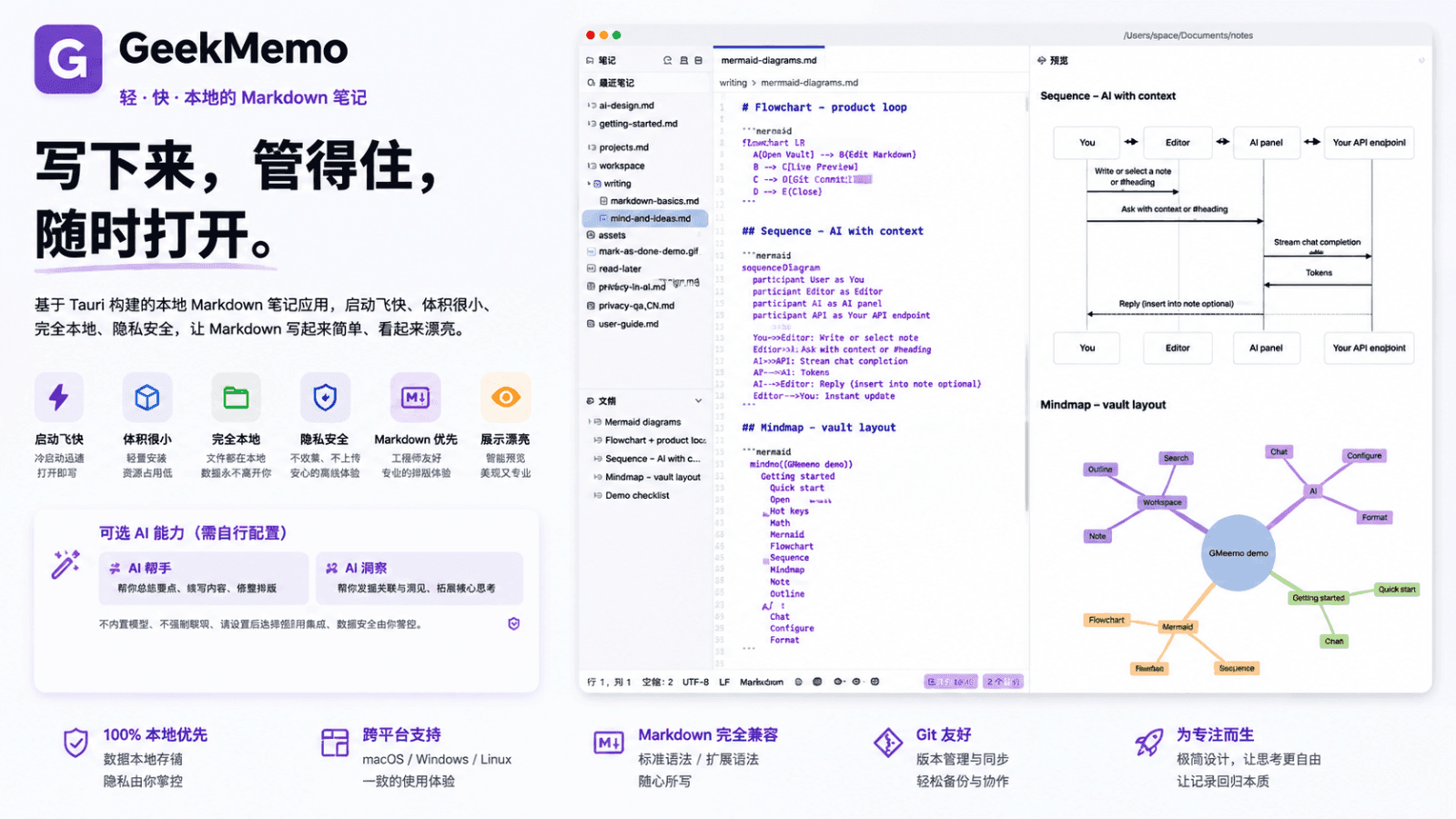
GeekMemo is designed for people who need "write it down, keep it under control, open it anytime": not another cloud-based knowledge base, but a lightweight, reliable local Markdown notebook.
Your notebook library is just a folder on your disk; each note is a plain .md file, directly readable and writable via Git, other editors, or scripts. Fast cold start, small installer size, ideal for keeping in the Dock. No account required, no cloud sync, and notes are never uploaded by default.
Light & Fast
Native desktop shell—aiming for minimal wait when opening the app, switching notes, or viewing live previews. No bloated runtime bundled; write whenever you think, save immediately after writing.
Fully Local
Remembered path upon launch—continue from where you left off next time. Migration, backup, and version management all happen at the filesystem level; your content always stays in your hands.
Simple to Write, Beautiful to Read
Familiar Markdown syntax with formatting toolbar; left-side editing, right-side real-time preview. Code, formulas, flowcharts, and local images render cleanly. Preview can also be exported as a long PNG image.
Privacy & Security
Default settings do not collect identifiable personal information, do not upload note content, nor perform usage analytics. Optional AI features only connect to the internet when you manually configure an API endpoint yourself—requests go directly to your chosen service provider, never through Z Studio.
- Files Are Notes: Any local folder can serve as a notebook library; only
.md files are treated as notes. Create, rename, delete, drag-and-drop organize; opened paths are persisted.
- Dual-Pane Real-Time Preview: Left side uses CodeMirror for editing, right side renders instantly. Preview can be collapsed, expanded to fullscreen, or exported as a PNG long image.
- Rich Rendering: GFM support, code highlighting, KaTeX (inline
$…$ / block $$…$$), Mermaid, relative-path local images.
- File Tree, Search & Outline: Search by filename or content; outline allows jumping to edit positions by heading.
- Tab Workflow: Single-click opens preview tab, double-click pins it; unsaved changes show dirty indicators. ~800ms debounce auto-save supported, plus
⌘S / Ctrl+S.
- Multi-language & Appearance: Simplified Chinese, Traditional Chinese, English, Japanese, 한국어; light/dark mode follows system settings.
The app does not include a default large language model nor bundle any API key. Local editing, preview, and long-image export are independent of subscription. After subscribing, configure OpenAI-compatible endpoints, models, and keys (stored locally only) under "Settings → AI Settings", and customize formatting / polishing prompts.
| Capability | Description |
|---|
| AI Formatting | Standardize current document’s Markdown structure and line breaks while preserving original meaning |
| AI Polishing | Optimize overall expression without altering core facts or structure |
| AI Fine-tuning | Rewrite selected text according to your instructions, replacing only the selected portion |
When AI is unconfigured or unused, local writing remains unaffected. When invoked, data is sent to your configured endpoint—Z Studio never acts as a middleman; model costs are settled directly between you and your service provider.
- Developers, researchers, and students: Need fast writing for technical content, with notes stored as standard files manageable via Git.
- High-efficiency writers: Tutorials, API documentation, project logs—want easy formatting, great preview quality, and convenient export/share.
- Privacy and minimalism advocates: Reject mandatory accounts and cloud lock-in; full control over data paths.
Ideal for technical documentation, formula derivations, local knowledge bases, or quick jotting. Content remains plain Markdown—no platform lock-in when switching computers or integrating into existing workflows.
- Official Direct Distribution: Lightweight installer, download and use immediately.
- Mac App Store: Free download; optional auto-renewing subscription for GeekMemo Pro (
com.zstudio.geekmemo.pro) unlocks AI features. Purchases, refunds, and billing follow Apple’s rules.
GeekMemo: Light, Fast, Local—let every thought belong only to you.