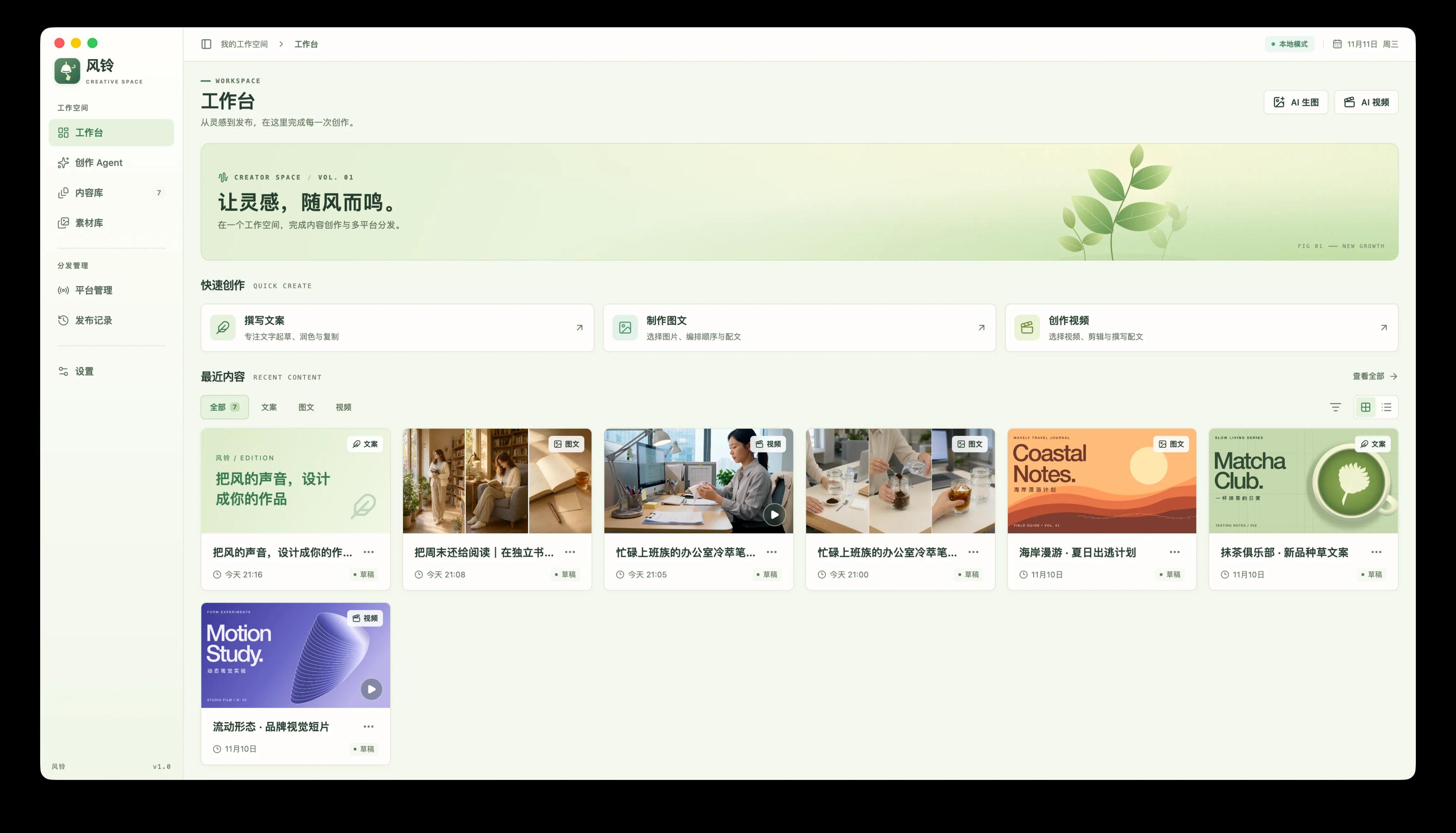
Fengling is a creative workspace that stays on your computer. Copy, image posts, short videos, assets, and publish history are stored locally. The app does not ask you to create an account.
The first launch includes three editable samples. Start from those, or create a new text, image, or video draft. Image adjustments and video export run on your machine. Connect your own text, image, or video model only when you want generated material.
Work stays local
Drafts, assets, publish history, and edit projects live in the current workspace. You can move the data folder; the app copies existing work to the new location and leaves the original folder in place.
Write, design, and edit together
Draft copy, arrange image posts, and cut video from the same workspace. Crop, grade, and caption still images, trim a clip, or open the multi-track editor and export a finished video.
Models you choose
Text, image, and video models are saved separately, and each type can hold more than one service. Local editing and asset tools keep working when no model is configured. Generation requests go to the address you enter, not through Z Studio.
Publish only after you confirm
Connect a Xiaohongshu or Douyin account, then choose the destination from a draft. Each account keeps its own sign-in session. Publish history shows the result for each platform. If a site asks for a code or extra details, finish that step in the platform window.
- Workspace: write copy, build an image post, or start a video, and return to recent drafts. AI image and AI video open separately; results are saved to the asset library before you use them.
- Creation agent: begin with a short brief. The agent uses your configured text model to plan, write, and review, then saves a local draft. You can point it at older drafts and library files, and keep revising in the same conversation. It does not publish just because a reply contains the word “publish”.
- Content library: search, filter, and sort text, image, and video drafts in one place.
- Asset library: import images, video, and audio, then rename, preview, or delete them. Files already used by a draft, an edit project, or a publish record stay referenced so they are not removed by mistake.
- Image studio: crop with a free or fixed ratio, rotate, flip, adjust color, add text, and combine 2 to 9 images. Saving creates a new asset and leaves the original file unchanged.
- Video editor: place video and images on the main track, then arrange picture-in-picture, subtitles, music, and voice. Import or export SRT. Projects are stored in the current workspace and export to MP4 in the asset library. You can edit a project in the browser; encoding requires the desktop app.
- Channels: sign in to Xiaohongshu or Douyin in the official creator window. Removing an account clears the sign-in data stored on this computer for that account.
- Creators who want assets, drafts, and account sessions to remain on their own computer.
- People who already have text, image, or video models and want writing, design, editing, and distribution in one workspace.
- Anyone who prefers to finish a draft locally and confirm it before sending it to Xiaohongshu or Douyin.
Fengling: keep the idea on your machine, and send the work when you are ready.